

Draw Management
Control, review, and approve rehab-related budgets and draw requests within a structured workflow.
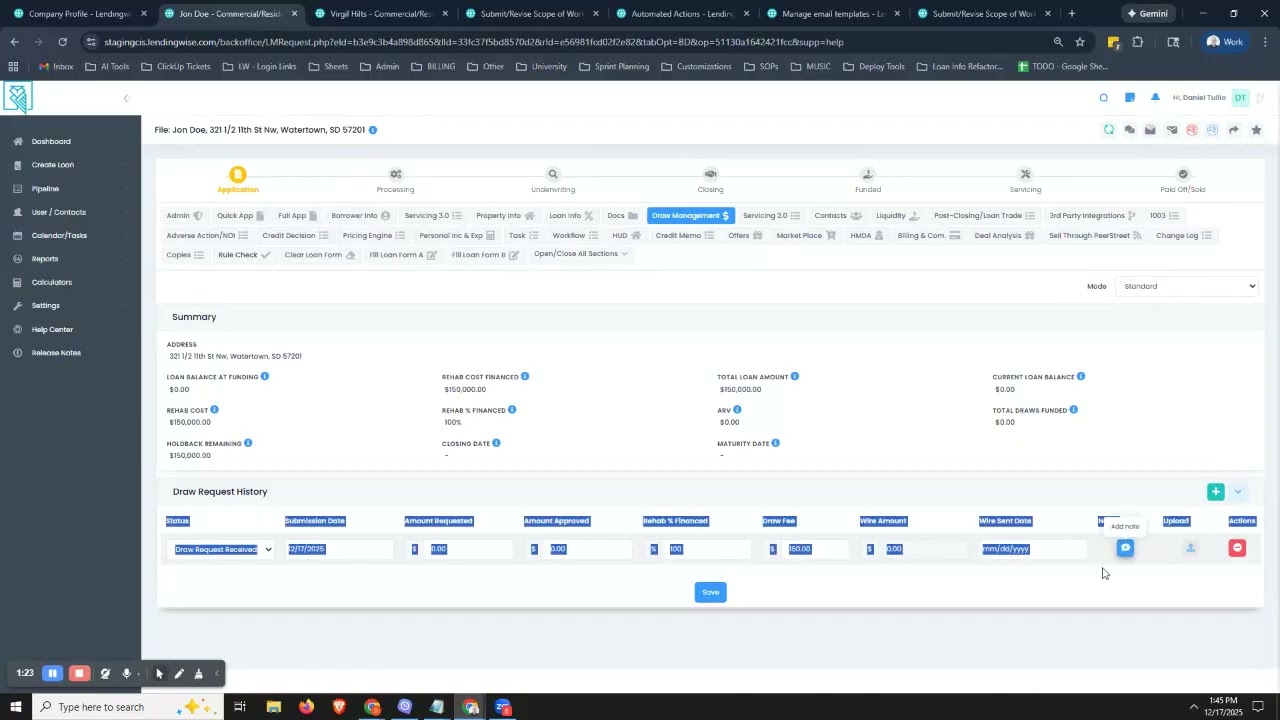
Use Draw Management to control, review, and approve rehab-related budgets and draw requests within a structured workflow.
What this module does
The Draw Management module enables borrowers to submit line-item rehab budgets, called Scopes of Work, and request draw disbursements against approved line items. Lenders retain full approval authority at every stage.
The module provides:
- Line-item budget visibility
- Formal draw request submissions for borrowers
- Controlled approval and rejection workflows for lenders
- Full audit history across the loan lifecycle
What this module does not do
Draw Management does not automatically disburse funds.
Approval in LendingWise authorizes a draw but does not move money. Lenders remain responsible for releasing funds outside the platform unless integrated with a third-party service.
Why lenders use Draw Management
Lenders use Draw Management to:
- Enforce approved rehab budgets before funds are released
- Reduce draw disputes and borrower back-and-forth
- Create a permanent audit trail for compliance, investors, and servicing
- Align inspections, budgets, and draw approvals in a single workflow
Who this module is for
Lenders
Lenders can:
- Review and approve or reject scopes of work
- Review and approve or reject draw requests
- Review and approve or reject budget revisions
- Maintain audit and compliance visibility
Borrowers
Borrowers interact with the system only to:
- Submit an initial scope of work
- Request draws against approved line items
- Request revisions when permitted by lender settings
All borrower actions require lender review and approval.
High-level draw lifecycle
- Borrower submits a Scope of Work.
- Lender reviews and accepts or rejects the Scope of Work.
- Borrower submits a Draw Request.
- Lender reviews and approves or rejects the Draw Request.
- Lender releases funds outside the platform.
Getting started: one-time setup
Enabling Draw Management
Standard mode
Standard mode allows lenders to manually record draws. It does not support borrower-submitted budgets or draw requests.
Premium mode
Premium mode enables:
- Borrower-submitted scopes of work
- Line-item budget enforcement
- Draw and revision requests
To upgrade to Premium mode, contact [email protected].
Lender configuration and settings
Feature settings
| Setting | Description |
|---|---|
| Default Draw Fee | Suggested fee applied per approved draw |
Budget settings
| Setting | Description |
|---|---|
| Budget Enforcement | Enforce a fixed budget structure or allow open-ended budgets |
Revision settings
| Setting | Description |
|---|---|
| Revision Permissions | Control whether borrowers may request revisions and whether total budget increases are allowed |
Allowing budget increases may require underwriting or credit re-approval. Most lenders restrict increases to prevent scope creep.
Roles and permissions
Borrower permissions
Borrowers may only:
- Submit scopes of work
- Submit draw requests
- Submit revision requests, if enabled
- Upload documents
- Add notes at the line-item level
Lender permissions
Lenders may:
- Accept, reject, or request revisions on scopes of work
- Approve or reject draw requests
- Approve or reject revision requests
- Communicate via line-item notes
Borrower workflow: what lenders will see
1. Scope of Work submission
Borrowers submit a line-item rehab budget when requested by the lender, typically pre-appraisal.
Lenders can view:
- Budget categories and line items
- Cost amounts
- Completed work indicators
- Supporting documents and notes
Lenders can:
- Accept the Scope of Work
- Reject the Scope of Work
- Request revisions
Once submitted, the request appears in the Draw Management tab and enters review status.
2. Draw Request submission
Borrowers may submit draw requests only after a Scope of Work is accepted.
Lenders can view:
- Requested amounts per line item
- Progress against approved budget
- Supporting documentation
- Borrower notes
Lenders can:
- Approve the Draw Request
- Reject the Draw Request with reasons provided per line item
3. Revision Request submission
Borrowers may request revisions to approved budgets if permitted by lender settings.
Lenders can view:
- Modified line items and amounts
- Net impact to total budget
- Supporting documentation
Lenders can:
- Approve the Revision Request
- Reject the Revision Request
4. Draw status and history
Borrowers can view:
- Current draw status
- Approved versus requested amounts
- Historical disbursements
This visibility reduces borrower inquiries and disputes.
Lender workflow: review and approval
Reviewing a Scope of Work
Review scopes of work from the Draw Management tab within the loan file.
Before reviewing, confirm that the loan file includes a holdback amount in the Rehab Cost Financed field.
Lenders can:
- Accept the Scope of Work
- Reject the Scope of Work
- Request revisions
Reviewing draw requests or revisions
Review the following details before approving or rejecting a draw request or revision:
- Line-item completion values
- Requested amounts
- Supporting documentation
- Notes and comments
Lenders can:
- Approve the request
- Reject the request with line-item-level reasons
Approving and funding draws
When a draw is approved:
- The status updates to Approved.
- The borrower may submit additional draws or revisions.
- Notifications are triggered automatically.
Approval does not release funds. Lenders must disburse funds outside LendingWise unless using an integrated service.
Automation and merge tags
Automated actions
The automation engine can:
- Notify borrowers and lenders on submission, approval, or rejection
- Trigger different notifications for budget submissions, draw requests, and revision requests
Automation triggers
- Submitted
- Accepted
- Rejected
Available merge tags
##Rehab Construction Financed####Total Draws Funded####Current Escrow Balance####Project Completion Percentage####Default Draw Fee####Summary of Draws####Draw Request Latest####Draws Fee Latest####Date Requested Latest####Draw Status Latest####Draw Approved Percentage Latest####Approved Draw Amount Latest####Funded To Borrower Latest####Date Funded Latest####Draw Notes Latest##
Where merge tags can be used
- Emails
- Documents
Optional: Trinity integration
Trinity handles
Trinity handles:
- Initial budget review and feasibility products
- Inspections
- Detailed inspection reports
Lenders pay Trinity directly.
LendingWise handles
LendingWise handles:
- Capturing borrower-submitted budgets and draw amounts
- Ordering inspections through the platform
- Sending data to Trinity and returning reports to the loan file
Lenders retain final approval authority regardless of inspection outcomes.
For the full knowledgebase article, see Trinity Real Estate Solutions Integration (Draw Management).
Statuses and notifications
Draw status definitions
| Status | Visible to | Meaning |
|---|---|---|
| Submitted | Borrower / Lender | Awaiting lender review |
| Approved | Borrower / Lender | Authorized for funding |
| Rejected | Borrower / Lender | Not approved; resubmission required |
Notifications
Notifications are:
- Fully driven by the automation engine
- Fully customizable for email content
- Delivered by email
Audit trail and history
All draw activity is permanently recorded in a history timeline, including:
- Budget versions
- Draw submissions
- Approval and rejection decisions
Lenders and borrowers can view audit history.
If you need additional help, contact [email protected].
Updated 3 months ago